Auth vs Connect
Understanding the difference between EOS Auth Interface and Connect Interface for authentication
EOS provides two authentication interfaces. Understanding the difference is crucial for choosing the right approach for your game.
Connect Interface
The Connect Interface authenticates users to access Game Services without requiring an Epic Games account.
How it Works
- User logs in with a third-party platform (Steam, Device ID, etc.)
- EOS creates a Product User ID for game services
- No Epic account required
Supported Login Methods
- Device ID (anonymous)
- Steam
- PlayStation Network
- Xbox Live
- Nintendo
- Discord
- Apple
- Oculus
Available Features
| Feature | Available |
|---|---|
| Lobbies & Sessions | ✅ |
| Matchmaking | ✅ |
| P2P Networking | ✅ |
| Voice Chat | ✅ |
| Stats & Leaderboards | ✅ |
| Achievements | ✅ |
| Player Data Storage | ✅ |
| Title Storage | ✅ |
| Anti-Cheat | ✅ |
| Epic Overlay | ❌ |
| Epic Friends | ❌ |
| Epic Presence | ❌ |
When to Use
- Games not on Epic Games Store
- Games that don't need Epic social features
- Quick prototyping and testing
- Anonymous/guest accounts
Auth Interface
The Auth Interface authenticates users with Epic Account Services, providing full EOS functionality.
How it Works
- User logs in with Epic Games credentials (or links external account)
- EOS creates an Epic Account ID for account services
- A Product User ID is also created for game services
Supported Login Methods
- Epic Games Account Portal
- Persistent Auth (remember me)
- Epic Games Launcher (Exchange Code)
- Developer Tool (for testing)
- External Auth (Steam, etc.) with account linking
Available Features
| Feature | Available |
|---|---|
| All Connect features | ✅ |
| Epic Overlay | ✅ |
| Epic Friends | ✅ |
| Epic Presence | ✅ |
| Social Invites | ✅ |
| Account Linking | ✅ |
When to Use
- Games on Epic Games Store
- Games that need Epic social features
- Cross-platform with Epic account linking
When using Auth Interface with external platforms like Steam, users without an Epic account will be prompted to link or create one on first login. This is a one-time process.
Comparison Summary
| Aspect | Connect Interface | Auth Interface |
|---|---|---|
| Account Type | Product User ID | Epic Account ID |
| Epic Account Required | No | Yes |
| Setup Complexity | Simple | More setup |
| Epic Overlay | No | Yes |
| Epic Social Features | No | Yes |
| Best For | Non-Epic games | Epic Store games |
Using Both Together
Many games use both interfaces:
- Auth Interface for Epic Games Store users (full features)
- Connect Interface for Steam-only users (game services only)
EIK handles this seamlessly - you can authenticate with either interface and access the appropriate features.
In EIK
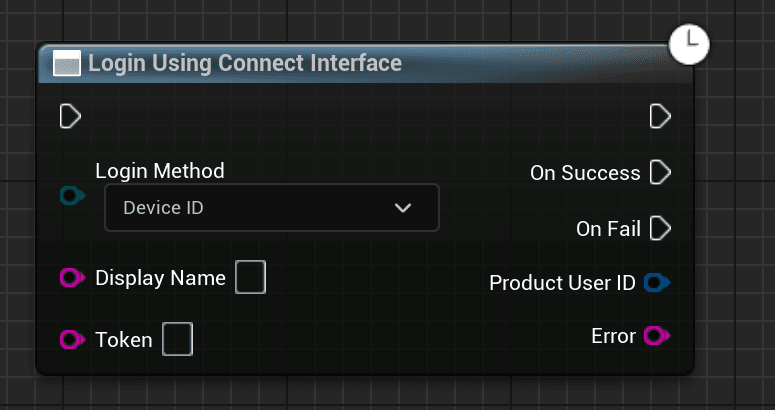
Use the Login Using Connect Interface node:
Use the Login Using Auth Interface node with your preferred login type (Account Portal, Persistent Auth, etc.)